Word War III – Dev Diary – 01: Getting started

So I’ve decided to knuckle down and build AND actually release a game. I read somewhere (probably Reddit) that publishing a development diary really helps on the motivation front. It sounds like a good idea so here we are :-)

Some constraints

First off to narrow my focus I have decided that:

  • I will make a 2D game. My 3D modeling is OK but it takes a loooong time.
  • My target is a mobile app. So distribution is taken care off.
  • Android is my initial platform: I already have test devices and dev platforms
  • I’m going to use the Unity3D platform. I bought the Android and iOS platform licenses a while back so I should really use them. Also its a very nice cross-platform tool.

Time

Nothing kills a side project like the distractions of everyday life. Luckily Mrs Gremlin suggested a few weeks ago that I earmark Monday nights for doing some game development. I’m taking her up on her offer. My wife is the best!

but Unity isn’t 2D…

No it isn’t but it handles lots of polygons which when textured and put on a plane equals lots of GPU accelerated sprites.

After digging around I found Futile. It’s new, has zero documentation but the intro videos and sample code looked good.

YouTube Preview Image


The developer also set up a Futile sub-reddit and he is very active on it. So I decided to give it a go.

I knocked together a shell of a space invader game using these neat graphics. Futile appears to do exactly what it says on the tin and it seems intuitive to use. Here is a short clip of my test project:

YouTube Preview Image


The pitch

Ok now for the elevator pitch:

The game is hangman with a time limit rather then guess limit. When a player guesses a word they are presented with a new one. The words the player gets to guess get progressively harder as the game goes one. The game has a time limit of 120 seconds with a progress bar incrementing towards game over every second. Each correct letter guess reduces the bar by 2 seconds. Each failed guess adds 1 second. Completing a word knocks off 10 seconds.

The game has a nuclear armageddon theme. The progress bar is broken up into DEFCON levels 5 to 1. The game is named “Word War III”.

Kick off

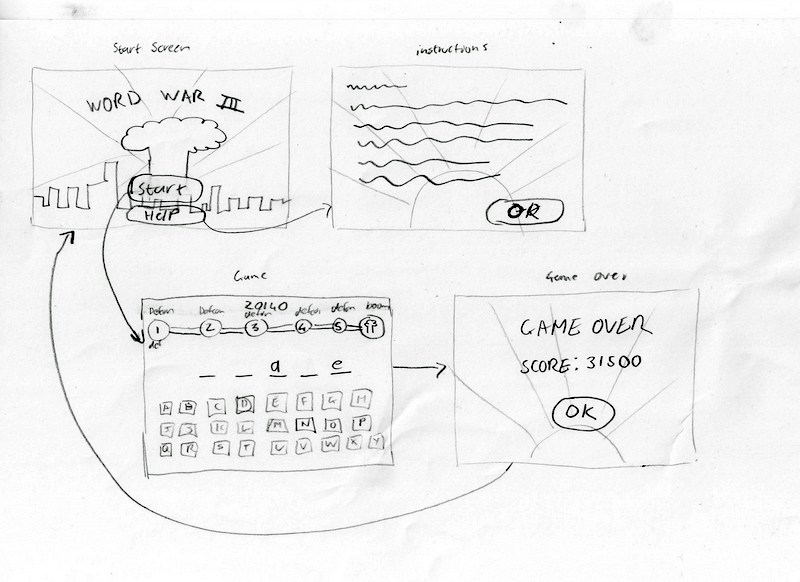
First up I sketched out some screen flows and layout ideas. Things like high score tables etc can come later:

Mrs Gremlin offered to build a title page for me (using Illustrator) and I knocked up the game page to test out the layout of the letter keys. I’m normally create game graphics using Inkscape which is vector based, this allows graphics to be easily scaled and resized as things develop. Here is the title page and the game page layout test:

The fonts are Passion One and Hand of Sean. Unfortunately it looks like the license for Hand of Sean has recently changed and it is no longer free so I’ll need to find a replacement for it.

Using BMFont I created some font atlases and then used TexturePacker (I bought the Pro version) to pack all the assets into the following atlas:

One issue I had is that I failed to export the font images as 32bit images. This caused all sorts of weirdness when TexturePacker created the atlas.

Also Futile spat the dummy when tring to load the smaller of the font sets. Some array index out of bounds error that I haven’t had time to track down.

Next I got down to some actual coding using the FSprite, FLabel and FButton classes I created the game screen. Testing on a actually device showed that my buttons were too small. Mrs Gremlin also pointed out that the keys should laid out in a QWERTY fashion. Some more tweaking and I ended up with this:

YouTube Preview Image

Not a bad start for a few hours of work.

Update: Click here for the next post in this series

Did Microsoft just kill Flash? IE10 won’t run Flash unless your site is on a Microsoft whitelist!

Yeah you read that right. I just received an interesting email from Brightcove (the video delivery guys) about issues with their Flash based solution and Windows 8 running the new Internet Explorer 10. To quote:

We wanted to make you aware of a development with Microsoft around Windows 8 that may affect your video content delivered through Brightcove Video Cloud.

Background

Microsoft is expected to release the next version of Windows, Windows 8, on October 26th. With Windows 8, Microsoft has made a decision to limit the use of Flash as a means for delivering content and move toward a concept of a plug-in free experience in Internet Explorer 10. As a result, sites will not be allowed to serve Flash in Internet Explorer 10 unless they have been given prior approval and have been whitelisted by Microsoft.

What this means for you

The default browser experience in the new Windows UI will not allow Flash unless the site has been approved and granted access by Microsoft. Therefore, if a Brightcove Video Cloud customer is looking for a full featured playback experience that is on par with Windows 7 today, they will need to submit a request to Microsoft in order to be whitelisted.

My initial reaction was “surely not???” and a quick search of the web indicates that there is a great deal of confusion as to what the IE10 behavior will actually be. However the Brightcove email provides an link to a handy Microsoft support article which clears things up.

Basically:

  1. Windows 8 ships with two (!) versions of Internet Explorer 10. One for the desktop experience and one for the Windows UI experience.
  2. Both ship with a built in version of Flash BUT the Windows UI version won’t run Flash unless your site is on a whitelist. The Desktop version will run Flash as normal.
  3. You can add a meta tag to your pages which will trigger a prompt to the user to run your site in the desktop IE if they visit it using the Windows UI version of IE (a lovely user experience… not)
  4. Lastly they give details on how you get you site added to the whitelist (basically emailing Microsoft with the details of your site and details of how it conforms to Microsoft’s Flash Content Guidelines)

Buried in the support article is the following reasoning for the difference in behavior between the Desktop and Windows UI IE version’s Flash support:

While any site can play Flash content in Internet Explorer 10 for the desktop, only sites that are on the Compatibility View (CV) list for Flash can play Flash content within Internet Explorer 10 in the the new Windows UI. We place sites with Flash content on the CV list if doing so delivers the best user experience in Internet Explorer 10 with those sites. For example, how responsive is the content to touch? Does it work well with the onscreen keyboard, or affect battery life? Do visual prompts comply with the Windows Store app user experience guidelines? Sites that rely on capabilities (for example, rollover events and peer-to-peer (P2P) functionality) that are not supported within Windows UX guidelines for Windows Store apps, and don’t degrade gracefully in their absence, are better off running in Internet Explorer 10 for the desktop with Flash.

Which seems fair enough but kinda underscores the point that having the Windows UI on the desktop version of Windows 8 (and making it the default) doesn’t really make sense when you consider what the user will be doing when they sit down at a PC to work.

It will be interesting to see if Windows 8 lands with a splash or a thud on October 26. I suspect it might be a thud and a whimper. Certainly it looks like Flash and the web are going to be in for a rough ride.


My Romo has arrived

imageMy Romo smartphone robot turned up yesterday! Romo is the brain child of a couple of guys in Las Vegas and the result of a pretty sucessful Kickstarter project (the first I have ever contributed to).

Romo is a simple tracked bot, about 15cm long, which charges via USB. What makes the Romo very cool, is the fact that it’s brains is your smartphone!

The Romo connects via the headphones jack to your smartphone and it accepts commands via short bursts of sound, created by the apps you run on your phone. The commands sound like short chirps.

Currently an app is available for iOS and Android devices, which lets you remote control your Romo. For this to work, you need two devices, one plugged into the Romo as its brain and other that acts as a remote control. Communicating via Wifi, you can drive your Romo around, get a video feed of what the Romo is looking at (via the attached smartphone’s camera) , take pictures and change the Romo’s expression with accompanying sound effects.

Unfortunately the Android app running on my Nexus One and Acer Iconia A500 does not seem to work :-( My Nexus produced no movement at all and the A500 only sporadically turned on the one track. This caused a bit of panic as I thought that my Romo was defective but I then connected it to an iPhone (using an iPod Touch as the remote) and everything worked fine.

Hopefully future releases of the Android app will fix my problems (the app was only released a few days ago).

However for me, the most exciting thing about the Romo is the fact that it has a full SDK that lets you write your own apps. This makes the Romo particularly suitable as an affordable robotics platform. Currently the iOS SDK is available on github, the Android SDK is due for release “any day now”.

If you are interested in the communications protocol check out this file and this file from the iOS SDK (no protocol docs have been released by Romotive yet).

If you want your own Romo you can get one here.

Tutorial: Creating your first Unity Android App

This tutorial is out of date. See here for an updated tutorial covering the latest version of Unity.

This is a quick, step by step guide to creating a simple spinning cube app for Android using Unity. This tutorial is for windows but other then the install instructions it should work for other platforms. By the end of this tutorial you will have created an app that displays a red spinning cube on a blue background on your Android device.

Setup Unity

You will need Unity AND the Android feature to create the app. Unity basic is free and the Android feature is currently free till the 8th April 2012 (which saves you $400). Download the installer from here and get your license from here.

Install Unity and register it using your license key which should have been emailed to you.

Setup the Android SDK

To create an Android app you need to install the Android SDK, which can be downloaded from here. I have the SDK installed to c:\android-sdk-windows

Once the SDK is installed you need to add the Android 2.1 (API level 7) package. Run the SDK Manager and use it to download the API level 7 packages. See here for more info.

Lastly, you will need to install the USB device drivers for your Android device. Whilst it is possible to use the Android Emulator its performance is pretty bad (especially when emulating tablets) so you are much better off testing on a real device. If you are using a “Nexus” device you can install USB drivers using the SDK Manager, otherwise search the web for your devices drivers.

To test that everything is set up, plugin in your device, open a cmd prompt and run the following commands :

cd \android-sdk-windows\platform-tools
adb devices

Your plugged in device should be listed. You may have to enable USB debugging for your device. Go to Settings -> Applications -> Development and turn on USB debugging.

Creating the app

Start Unity and select File -> New Project to create a new project, name the project RedCube.

In the drop-down box in the upper right of the screen make sure 4 Split is selected.

Create the cube

From the GameObject menu select Create Other and then select Cube. Make sure that Cube is selected in the Hierarchy panel (3rd panel along the top of the screen), then in the Inspector panel (far right panel) set the following values for the cube:

  • Position: x = 0, y = 0, z = 0
  • Rotation: x = 0, y = 45, z = 45
  • Scale: x = 2, y = 2, z = 2

Position the camera

Select the Main Camera  in the Hierarchy panel and set the following properties for the camera in the Inspector panel:

  • Position: x = 0, y = 0, z = -5

Add a light

From the GameObject menu, select _Create Other _and then Point light. Set the following properties for the light:

  • Position: x = 0, y = 0, z = -5

Test the scene

Click on the Play button (top center of the screen). You should now see the lower left panel switch to the Game tab and you should see a white cube on a blue background.

Press the Play button again to stop the game.

Note this important! Unity allows you to make changes whilst the game is running but these changes are lost as soon as you stop the game running. This is great for debugging but is an easy way to lose you changes :)

Save your project

Speaking of losing your work, now is a good time to save your project. Select File -> Save Scene, enter RedCubeScene as the name for the scene when prompted. Then select File -> Save Project to save the project. Remember to save your work regularly.

Making the cube red

Right click in the Project panel (3rd along the bottom) and then select Create -> Material, name it RedMat. In the Inspector window click on the white color block next to Main Color and then select a red color from the color picker. Drag the RedMat material from the Project window onto Cube  in the Hierarchy window. The cube should now turn red in the various scene windows.

Making the cube spin

In Unity scripts are used to add behavious to objects and to create the logic of your game. We will use a script to make the cube spin.

Right click in the Project panel and select Create -> C# Script, name it Spin.

In the Inspector window click the Open button, give it a moment for the MonoDevelop IDE to launch. You should see a code editor window. Modify the code to read as follows:

using UnityEngine;
using System.Collections;

public class Spin : MonoBehaviour {
    // Use this for initialization
    void Start () {
    }

    // Update is called once per frame
    void Update () {
        // rotate at 90 degrees per second
        transform.Rotate(Vector3.up * Time.deltaTime*90);
    }
}

Save the code (press Ctrl+S) and then switch back to the Unity editor.

Drag the Spin script from the Project window on to Cube in the Hierachy window.

Press the Play button. You should now see a red cube spinning in the Game window. Press Play again to stop the game.

Building the app

Now that we have the app completed, we need to build it.

Select Edit -> Project Settings -> Player

In the Inspector window under the Per-Platform Settings click on the tab with the Android icon (3rd tab along).

In the Other Settings section change the following values:

  • Bundle Identifier = com.rabidgremlin.tut.redcube
  • Minimum API Level = Android 2.1 ‘Eclair’ (API Level 7)

Now, select File -> Preferences and then select the External Tools section. Click on the button next to Android SDK location and select the root folder of your Android SDK install (c:\android-sdk-windows in my case).

Next plug-in your device.

Now, select File -> Build & Run, this will open the Build Settings window. Select  Android under platform and then click on the Build & Run button, when prompted for a name for the .apk file enter in RedCube.

A build dialog will pop up and you will see the app being built, then you will see a message about the app getting pushed to your device.

Have a look at your device, you should see the RedCube app starting up, followed by a red cube spinning on a blue background.

Congratulations you have created your first Unity Android app !

What next?

First off go and complete the 3D platform game tutorial. This will give you a good understanding of how Unity works. Also check out the very comprehensive documentation and the very helpful community.

Now go nuts :)

Update: If you are interested in creating 2D games with Unity check out my Dev Diary for my game Word War III

Building a modern web app, some learnings

I recently built a fairly rich web application from the ground up. Whilst I’ve being building web apps since the mid-nineties this little project had a different flavour to it and I thought I’d go over my learnings here.

Firstly why was this project different:

  • its a Facebook app and uses their JavaScript SDK. This means that 99% of the app runs client side with only a small bit of server side code.
  • I’m was the sole developer. Normally I work with 2 or more other developers, focus on the back-end work and leave the bulk of front-end stuff to others
  • rapid development approach. The app was built quickly with me working closely with a UX guy and a designer. Whilst the functionality was locked down early on, the user interface and interactions evolved rapidly and iteratively.

First observation: its so easy

OK that is slightly facetious, but modern CSS and JavaScript frameworks mean that you don’t have to be guru to build nice looking, smooth functioning, cross browser applications.

For this application I used the Twitter Bootstrap CSS framework and the jQuery Javascript framework.

Get a designer

Yes I know I just said that it’s easy and you don’t need to be a guru to create nice looking apps BUT whilst Twitter Bootstrap encapsulates a great design, you are still going to want to customise it.

Designers have the knack of adding the odd image, drop shadow or bit of whitespace that can make a perfectly ok looking web page just suddenly pop. Not to mention the selection of color a palettes and general pixel pushing.

On a similar front having a UX guy on hand is invaluable. If you don’t have one, then read Steve Krug’s Don’t Make Me Think book and then go and find yourself a UX guy  :) 

Facebook

The Facebook API is now pretty mature and is very stable (compared to the last time I used it a few years ago).

One annoying things is that the calls that you make to explore the user’s social graph (via the FB.api function) are very low-level and the data is returned in a callback. This can make your code very messy, since you often have to chain your app’s logic in the callback function, if your app needs data before it can proceed. For example:

FB.api('/me', function(response) {
  // do something with response here
  // make next api call (with nested callback) here
});

Additionally if you need to, for instance, retrieve friend profile data you can land up making hundreds of calls:

// grab all my friends
FB.api('/me/friends', function(response) {

    $.each(response.data, function(index, value) {
       // get profile for each friend (this triggers another HTTPS call)
       FB.api('/' + value.id , function(profile) {
         // do something with profile data
       });
    });

});

Luckily there is a better way, the FB.query and FB.waitFor functions. These let you run queries against a user’s data using a SQL like language (FQL) and then block waiting for the response. This greatly reduces the time it takes to retrieve data and keeps your apps logic a bit simpler:

var query = FB.Data.query('SELECT uid,name,current_location FROM user WHERE uid IN (SELECT uid1 FROM friend WHERE uid2=me())');
query.wait(function(rows) {
    $.each(rows, function(index, value) {
       // do something with friend data here
    });
});
// rest of app logic continues here

Firebug

Get it (hopefully this isn’t news to you). This tool is invaluable for web development. It allows you to debug JavaScript, view the DOM, check network traffic and tweak CSS in browser.

It’s also a good idea to test you app in different browsers as you go. During this app’s build I had FireFox, Chrome and IE 8 all running so I could see that everything was working. Luckily by using Twitter Bootstrap and jQuery I had no cross-browser issues at all other then the fact that IE didn’t get nice round corners.

Make sure it validates

The W3C provides a tool for validating web pages. It’s always good to be sure that your pages validate, not just because it is good practice but because it stops browsers from entering their “quirks mode” which often causes odd and quirky behavior.

The Web Developer plugin for Firefox provides a handle shortcut for submitting your local HTML to the W3C validator.

In my case everything validated except for the Facebook namespace declaration and the custom Facebook tags such as fb:like. Whilst there are ways around this I decided on not been too purist.

HTML5

Try use HTML5 for your app. It works very nicely. For IE browsers (before 9.0) use the HTML5 shim to get some HTML5 support.

However Twitter Bootstrap does not support IE6, so I used this trick to make any IE6 browsers redirect the user to a “browser unsupported” page with tips on how to upgrade their browser. In the __section add the following comment:

 <!--[if lt IE 7]><script type="text/javascript">window.location = 'notsupported.html';</script><![endif]-->

This uses the conditional comments feature of Internet Explorer to redirect IE6 browsers to the notsupported.html page, other browsers will simply treat it as a HTML comment.

Improving load times

It is best practice to load all the CSS files in the section of the page and all the JavaScript files at the end of the page (just before the </body> tag). This makes the page feel much more responsive as the browser can start to render and layout the page before everything is loaded.

Having said that, a complex web app tends to pull in a lot of CSS and JavaScript files and minimizing the number of objects that are fetched from the server is a key factor in having a speedy app.

Ideally you only want your app to load a single CSS file and a single Javascript file. To achieve this in my app I concatenate the CSS files and JavaScript files (in the correct order) and then compress them using Yahoo’s YUI compressor.

Since I wanted this to be a repeatable process I used Ant to create a build script to do this. Firstly the concatenation:

<concat destfile="${tmp.dir}/all.js">
  <fileset file="${www.dir}/jquery.min.js" />
  <fileset file="${www.dir}/jquery-ui-1.8.16.custom.min.js" />
  <fileset file="${www.dir}/jquery.masonry.min.js" />
  <fileset file="${www.dir}/bootstrap-modal.js" />
  <fileset file="${www.dir}/bootstrap-twipsy.js" />
  <fileset file="${www.dir}/bootstrap-alerts.js" />
  <fileset file="${www.dir}/app.js" />
</concat>

And then the compression:

<exec executable="java">
  <arg value="-jar"/>
  <arg value="yuicompressor-2.4.7.jar"/>
  <arg value="${tmp.dir}/all.js"/>
  <arg value="-o"/>
  <arg value="${tmp.dir}/all.js"/>
</exec>

Now during development you don’t want to be dealing with concatenated and compressed files so my PHP pages contain a snippet like this:

<?php
if ($config['mode'] != 'prod')
{
?>
    <script src="jquery.min.js"></script>
    <script src="jquery-ui-1.8.16.custom.min.js"></script>
    <script src="jquery.masonry.min.js"></script>
    <script src="bootstrap-modal.js"></script>
    <script src="bootstrap-twipsy.js"></script>
    <script src="bootstrap-alerts.js"></script>
    <script src="app.js"></script>
<?php
}
else
{
?>
    <script src="all.js?@buildtimestamp@"</script>
<?php
}
?>
</body>

With mode getting set in my app’s config file.

Of course there are a ton of other things you can do to tune your app. Get the YSlow addon for Firebug and run the report on your pages to see what can be done.

Cache busting

Ant can also very helpfully update parts of your files whilst copying them around. This can be used to burn in all sorts of things, like version numbers and build timestamps. It can also be used create a effective cache buster when a new version of your app is released….

Firstly you need to set up an Ant property with an appropriate value:

<tstamp>
  <format property="buildtimestamp" pattern="yyyyMMddHHmmssSSS" locale="en,UK"/>
</tstamp>

Then in your HTML you can append @buildtimestamp@ following to file references:

<link rel="stylesheet" href="all.css?@buildtimestamp@"/>
...
<script src="all.js?@buildtimestamp@"></script>

Then lastly apply a filter in Ant when you are copying the files around:

<copy todir="${tmp.dir}">
  <fileset dir="${www.dir}">
    <include name="**/*.php" />
  </fileset>
  <filterset>
    <filter token="mode" value="prod" />
    <filter token="release" value="${rel}" />
    <filter token="buildtimestamp" value="${buildtimestamp}" />
    <filter token="builddate" value="${builddate}" />
  </filterset>
</copy>

PHP config file

To keep things nice and clean, I created a config.php file looking like this:

<?php if ( ! defined('CONFPATH')) exit('No direct script access allowed');

// set this to '@' + 'mode' + '@' during development so that style sheets and javascript files are individually included (see index.php)
// ant build scripts will replace this at build time
$config['mode'] = '@mode@'

?>

Then in my other PHP files I pulled in the config file using:

<?php
   define('CONFPATH','config.php');
   require_once CONFPATH;
?>

As you can see from the comments and the Ant snippets above, I overwrite the mode value with _‘prod’_ during my Ant build process to ensure that my compressed .js and .css files are used.

Miscellaneous files

Finally make sure you add a favicon and a robots.txt to avoid annoying 404 webserver logs. For fun why not add a humans.txt too.

Summary

Well that pretty much covers it. Hopefully there are one or two new  ideas here that you can use in your apps. Feel free to post any questions in the comments section below.
Help Stop SOPA

Please help stop SOPA by completing this form! If you aren’t in the USA click on the “Not In US” option at the bottom of the form.

SOPA is a new US law that is getting voted on in the next few days, it will fundamently affect the way the Internet works and it will therefore directly affect you!

Want to know more about SOAP ? Checkout this infographic or this video

AnimfxNZ 2011 – day 2

Just finished up Day 2 which was spent in the Games Master class. I took a ton of notes but I’ll just jot down some interesting points otherwise it will be a long long post :-)

Patrick Hudson – covered launching new IP by walking through the development of “Orcs must die”. Interesting to me was the fact that marketing was 10% – 20% of development budget, the issues with getting the game on XBL (needing a publisher and some middleware performance issues). Also the industry standard of the platform (Steam, XBL) taking a 30% cut with the developer getting 70%. If a publisher is involved they take 20% – 30% of the developers cut which seems pretty steep.

Eros Resmini – from OpenFeint talked about the Free to Play business model on mobile and the current state of play in this space. Currently iPhone top grossing apps are all F2P. He covered the F2P funnel which starts with distribution rather then ends with it. He made a very good point that if you have a F2P game then you are a services company, not a product company. I have my doubts on how easy it is for a small studio to pull off being a services company. 80% of revenue from 3% of users (the whales) was an interesting stat. He also made a good point that your game should be “pay for experience” rather then “pay to win”.

Lance Priebe – a slightly manic and rambling pressentation (including a magic trick) but he had some excellent sound bites:

  • Games are fueled by fans

  • Iterate, monitise each iteration and use it to fund the next one

  • Grow with your audience.  Start small, learn, grow

  • Crunch is simply the result of the failure to plan

  • A brand is not a logo, it is an emotion

  • UX designers are the most important people on the team. Make every click count.

  • Gaming is part of the human condition

  • The lemonade stand: the Internet has no passing traffic. You need to figure out how to get people to your game

He also provided a reading list: Tribes by Seth Godin, The long tail by Chris Anderson, Blue Ocean Strategy by Chan Kim, Free by Chris Anderson, Rework, The dip by Seth Godin.

In answer to my question re the size of the Club Penguin dev team he said they have 70 devs and 400+ support/service staff and more scattered around in offices world wide.

Tracey Sellar – covered DIY user testing. She focused on usability testing and how small studios can apply it. Wasn’t anything new here for me as it was pretty much standard software usability testing applied to games but the presentation had a lot of good practical tips. She recommended each test consist of 1 on 1 sessions, 1-2 hrs long, with 6 to 9 participants, with research showing this would typically uncover 80%-90% of usability issues. Also advocted early testing and even paper prototypes for things like game mechanics and UI.

Don Geyer – discussed his studio’s approach to building teams. Covered people, process and a bit on tools.

Most important to the team:

  • Intrinsically motivated people

  • Extrinsic motivation. They have an interesting approach of sharing of 60% of the profits split equally amongst the team

  • Teachability index – people who can accept new things adapt and change

  • Talent history

  • Teamwork history (no assholes)

They also use Keirsey Sorter profiling to figure out what management approach to take with each team member.

In terms of a management structure they use something they call C3:

  • co-creation: everyone contributes ideas etc

  • calibration: workflow tuning, co-location, mini-teams

  • concentration: everyone focuses on one particular part of the game. 80% of the team working on the current ‘block, 20% on pre production for next block.

Other tidbits:

  • trick is to find mistakes quickly

  • biggest issue is wasted work and effort due to mistakes. Impacts moral.

  • work smarter not harder. Lots of procedural content generation etc..

And that was it. One again a very good day. There have been a bunch of themes that have come out in the last few days. I’ll let them perculate for a while and then I’ll write them up.

AnimfxNZ 2011 – day 1

Just a quick post to cover my first day at Animfx. Apart from some AV glitches everything ran pretty smoothly and all the speakers were fantastic. The MC is hilarious but he didn’t really introduce himself so I have no idea who he is!

The speakers that I saw today were:

Lance Priebe – who gave a good account of Club Penguin and its history. Very interesting.

Patrick Hudson – ex Ensemble Studios who talked about their move from big budget to smaller scale games. Some interesting stuff here but it did sound a bit like “we have just discovered Agile dev” (there was more to it then that of course)

Tracey Sellar – from Microsoft’s usability/user research group discussing their work helping tune AAA titles. The video clip of the usability test session with a guy who obviously wasn’t much of gamer playing a GTA style game was hilarious.

Scott Foe – gave a very good presentation of the state of the game industry and what a studio needs to be doing to be successful.  Interesting push for getting a minimum viable product to market and the using Kanban to create content and updates in a sustainable way.

David Rosenbaum – covering the history of the game industry, the current platforms and the next cycle of platforms and delivery channels.

Sean Kauppinen – threw up lots of facts and figures covering trends in technologies, platforms and markets. Nice interactive session.

And lastly Enrico Casarosa from Pixar who premiered “La Luna” the new Pixar short film. Apparently this was the first time it had been shown in the Southern Hemisphere!  He then proceeded to give a detailed and fascinating account of the development of the short. I only wished that they would have played the short a second time so you could see it in light of all the great background detail that Enrico gave. Here is a YouTube clip from the short:

YouTube Preview Image

All in all very cool day. Tomorrow I’m in the “Games Master Class” which should be fun and on Thursday we get to go hang out at Weta which should be awesome.

The Food Bill

Yesterday I read Lance Wiggs’ post on making everyone in NZ part of the 1% which I believe is a fantastic idea. Of course to do this we need a government that works for the people and I’m not sure that it fully is…

Point in case, this week NZ signed the ACTA (when instead it could have being announcing a bill such as Brazil’s Civil Rights Based Internet laws) and of course there is the new Food Bill.

Introduced last month The Food Bill in its current form it effectively makes it illegal to grow food and share it with others! This blog post discusses the bill, covering all the tin-foil hat scenarios, including  the AOS kicking in the gates of maraes to confiscate their vegetables and seeds :)

Unfortunately as currently written the bill would actually allow these scenarios to occur. I thought I’d ask an MP about it and tweeted Green MP Gareth Hughes:

@GarethMP WTF is this Food Bill thing about ? nzfoodsecurity.org/2011/07/19/foo…

His response was:

@rabidgremlin hey it’s not as bad as some people are making out. Here’s Sue Kedgley’s view blog.greens.org.nz/2011/09/13/foo…

I’m not sure I agree with Gareth’s assessment but Sue’s response makes good sense (is it just me or are the Greens the only party that seem to have any common sense?) and would solve the problems in the bill, it will be interesting to see how this plays out.

This whole issue of course highlights the fact that governments are fallible and that poorly drafted laws can have a huge impact on our lives. We can’t just sit back and expect everything to fall into place, instead we need to become actively involved in our country, policies and government if we want to make New Zealand the country were everyone in it a part of the 1%.

More links:


(Un)happy Skynet day !

The Skynet Bill is passed. The system goes on-line September 1, 2011. Human rights are removed from the Internet. Skynet begins to accuse at a geometric rate. It becomes self-aware at 2:14 a.m. New Zealand time, September 29th. In a panic, they try to pull the plug…

but it is too late the NZ government has sold it’s soul and the people to the lobby groups

(Un)happy Skynet Day everyone! Have you stopped your torrents today ?