Response to my Auckland Train Signage rant

Well, I received a response from Auckland Transport about my Auckland Train Signage FAIL post. Unfortunately it wasn’t very helpful as they merely (and carefully) explained how the signs are going to work and why they removed the scrolling list of stations:

Thank you for contacting Auckland Transport regarding the new Real Time boards to be installed across the Auckland public transport network.

Your comments were forwarded to the Customer Information team who have provided the following feedback.

The decision to remove the scrolling message underneath the destination information as seen on the current Real Time boards, was made to allow enough room for the next two services to be displayed (rather than just the next one) and moves closer towards emulating a ‘metro’ or ‘national’ style service.

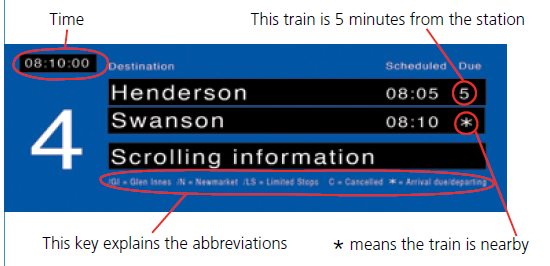
If you look at the bottom of the board, you will see information to explain the abbreviations that may appear on the screen.  These abbreviations will appear next to the destination name to advise the customer which key station the service is travelling via which will also allow customers to identify the line.

For example Papatoetoe/ GI would indicate that this service is travelling to Papatoetoe via Glen Innes on the Eastern Line, or Papatoetoe/ N would indicate that the service is travelling on the Southern line via Newmarket.

I trust his information is of use.

Thank you once again for taking the time to contact us and for your support of Auckland Transport.

Clearly they missed the point of my post which was: JUST PUT THE FRIGGING NAME OF THE LINE IN THE DISPLAY. The signs will be a million times better and you won’t need to add cryptic abbreviations nor require a traveller to have area and train network knowledge to figure out which train to catch.

My response to AT:

Thanks for the response,

Whilst I appreciate that the removal of the scrolling message frees up an additional line for information, I believe that adding /GI or /N, to the name of the terminating station, to indicate the line is counter intuitive and is certainly not in keeping with a ‘metro’ style service.

Surely it would be far better for the signs to read EAST – Papatoetoe or  _SOUTH – Papatoetoe_  (or perhaps EST Papatoetoe or STH Papatoetoe if space is an issue) ?

Using /GI or /N:

a) requires a key so that the user can figure out what the abbreviations mean

b) area knowledge to understand what/where Glenn Innes & Newmarket is

c) knowledge of the rail network to know that you need to take the train that goes via GI if you want the Eastern line and the train that goes via Newmarket if you want the Southern line.

Which is pretty useless for first time travellers and tourists.

Cheers

 

Ask Gremlin…

I’ve received a couple of interesting emails recently from people asking for advice. I figured my answers might be of use to others so here are the (redacted) emails:

Android App

The email:

I am wanting a Android Application designed for me. I am wanting to know a little more about Android Applications and how to go about getting one designed for me. How do the laws work around making a app and around how much would someone have to pay to get one designed? If a Android developer was to make a app for me would the rights of that app be mine or the creator? Sorry for the inconvenience I’m really new to this. Any information would be appreciated.

My response:

Hi ****,

A few years ago there was a move in NZ to better clarify ownership of intellectual property and copyright for “commissioned works” which includes software developement. However this amendment did not pass see: http://www.med.govt.nz/templates/ContentTopicSummary____18836.aspx

Although there are some existing laws that cover this area, what you want to ensure is that there is a clause in any contracts you sign (and you should ensure you have a contract with anyone who is written apps for you) that you own ALL the IP and copyrights on the work that is produced.

In terms of how much will it cost, the answer is it depends on how complicated the app is :)

Basically there are two general models followed for software development: “Time and Materials” (T&M)  or Fixed Price.

With T&M you generally pay the developer an hourly rate. For software development you can pay anything from $25/hr through to $150/hr. Typically the more senior or skilled the person, the higher their rates. Of course paying more doesn’t guarantee quality or success.

With Fixed price the price is determined ahead of time and that is the amount you will pay for the completed software. Whilst this seems a “safe” option, software development is often complicated and unexpected things turn up all the time, as such Fixed Priced contracts are often padded with a “contingency” to ensure that the developer makes money. If the project looks risky the contingency can be as high as 50% which means you would be paying far more for the work then it is worth. The other issue with fixed price contracts is that they often have a “change request” (CR) process which allows the developer to make additional charges for work (eg features of the app) that were not covered by the original specification (or “scope”) of the project. CR processes are often confusing & abused and you land up paying way more then you intended to in the end.

The best way to “protect” yourself against unforeseen costs is to be very, very, very clear on what you want to have built. In software development this is often called “scope” or the specifications of the project.

For an Android app I would suggest that you create what is called a wireframe or mockup of the app. You can use a tool such as http://balsamiq.com/ or http://yeblon.com/androidmockup/ or even paper & pen and sketch out each of the screens of the app, add notes about what each screen should do and how you navigate from one screen to another.

Once you have your wireframe sorted you can then shop around and get different quotes from different developers to find a price and developer you like. If you think your idea is particularly unique, you might want people to sign a non-disclosure  aggreement (NDA) before you show them your wireframes or talk to them about the app.

Lastly you might want to try and write the software yourself ! Have a look at http://appinventor.googlelabs.com/about/ as a “gently” intro to Android development. It will let you create a working prototype that you can actually run on your phone :)

Hopefully the above has been helpful.

Cheers

QR code generation

The email:

I saw your comment on the hack-a-day QRcode post.  You seem to have quite a bit of experience in QRcodes and other scanning apps.  One thing that I have been looking for (and maybe you might be able to help) is a program that creates unique QRcodes from list of URLs.  I’m helping out a non-profit **\* with their website and I was trying to find an easy solution to automatically create printable QRcodes for all of the ***\** at once.  This way each **** has their own QR code to an info page on a WordPress blog.  It could be done manually, but the ** change every two weeks! :)

A bonus would be automatically taking Bitly URLs and turning them into a bunch of printable QRcodes.

Just thinking

My response

Hi *****,

The Google Charts API can be used to quickly create QR codes. Check out: http://code.google.com/apis/chart/infographics/docs/overview.html and http://code.google.com/apis/chart/infographics/docs/qr_codes.html

So the following #aliases: https://chart.googleapis.com/chart?chs=150×150&cht=qr&chl=http://blog.rabidgremlin.com  would create a 150px by 150px .png QR code containing a URL to my blog (http://blog.rabidgremlin.com)

You could probably use a tool such as Curl or WGET to script the fetching of the bar codes.

Cheers

Auckland Train Signage FAIL

I’m an avid user of the trains in Auckland. It takes me 20 minutes to get from my house to downtown (and that includes a 8 minute walk) which sure beats getting stuck in rush hour traffic.

But one thing that has been driving me crazy for a long, long time now is the poor quality of digital signage. In it’s current state it is awfully confusing for first time travellers which why (with the RWC looming) I was pleased to hear that MAXX was investing in some new real-time signs.

Alas it appears seems that the new signs will actually be a gigantic step backwards :(

First some context. The Auckland rail network currently has 4 main lines, as shown in this very nice network map (click to enlarge it):

Each line is assigned a name (Eastern, Southern, Western, Onehunga) and nice distinct colour (yellow, red, green and blue). All very straightforward and very familiar to anyone who has seen the London underground or NYC subway maps.

Now a peculiarity of the Auckland network is that a number of lines have stations in common, in particular the Eastern and Southern lines, which share 12 stations. This is where things start to unravel…

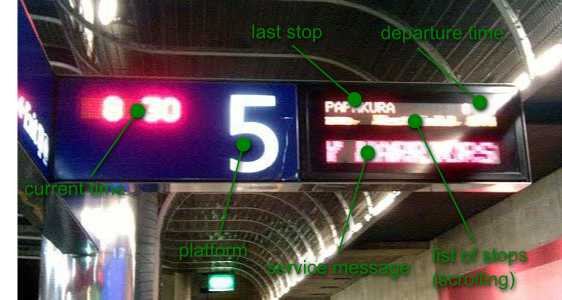
The current platform signs at Britomart look like this (apologize for the poor image quality):

Now if you look closely you will notice that NOWHERE on the board does it mention the train line! In fact since both the Eastern and Southern lines can terminate at Papakura the only way to tell which line you are on, is to watching the scrolling list of stops to see if the train is going via Glen Innes (Eastern Line) or via Newmarket (Southern Line). The problem is further compounded by the fact that trains on these lines may terminate at Otahuhu, Papakura or Pukekohe…

Imagine how confusing this is for first time travellers and tourists! They look at the nice network map figure out that they want the Eastern line and then when they get to the platform there is no mention of the line anywhere. Instead they need some area knowledge to figure out they want the train that is going via Glenn Innes, this is just awful.

The fix of course if pretty simple; just display the name of the line on the sign; Duh.

So you could have:

  • STH – Papakura
  • EAST – Papakura
  • STH – Otahuhu
  • WEST – Swanson
  • ONE – Onehunga

In fact this is what they do on the MAXX website when you search the train timetables and this is what I was hoping to see on the new signs….

This morning I was handed the MAXX/Auckland Transport’s On Board leaflet which, on pages 4 and 5, raves about the new real time information boards that are getting put in place. Here is the mock-up of the board from the leaflet:


Words cannot explain how crap the new sign’s design is.

First off the line name is still not displayed but worse the scrolling list of stations has now been dropped. Instead you have now have abbreviations (/GI, /N /LS) and you need a frigging key to explain them… seriously ? Clearly they let some of us techies loose on solving the “real-time” problem and gave no thought on making the sign actually useful.

Hopefully someone from AT or MAXX will see this post and come to their senses (or better yet if you know someone working on this project, pass them this link).

/RANT DONE – that feels much better

_UPDATE: I got a response from AT about this post_


Android Tips: Using a live wallpaper as your app’s background

This one took a while to find so it’s worthy of a tip :)

To use the current live wallpaper as your app’s background, simply set the theme for your activity to @android:style/Theme.Wallpaper in your AndroidManifest.xml:

...
<activity .... android:theme="@android:style/Theme.Wallpaper">
 ...
</activity>

What I did last week – 15 Feb 2011

Actually it’s more what I did last month.

RC simulator

A mate of mine bought himself a swish RC quad-copter. As part of the package he bought Phoenix RC. It is a simulator that allows you to plug your RC controller into a PC and you can then practice flying (and crashing) virtual RC models before tackling the real ones. Very useful and it clearly proved that I should never attempt to fly a real RC helicopter.

Kinect

Believe it or not, I’m actually getting paid to hack a Kinect. Im using the OpenNI framework so hacking really consists of installing the software and then using a nice high-level framework that does all the hard work for you. I’ve been very impressed with the skeleton tracking.  I’ve been able to simultaneously track 3 people with full skeletons without any issues.  This is the guide I used to install the base software. You should also check out the Ogre and Unity demos.

Unity

Whilst tinkering with the Kinect I ran through the Unity 3D platformer tutorial. Unity is very impressive. If you want to create a 3d game I’d start here.  The basic version is free. The cross platform nature of the engine is impressive to.

Auckland Buses app

I finally got around to releasing my Auckland Buses app for Android. It only took a few hours to put together.  I’m experimenting with an ad supported model. The app has about 225 users, averages around 25 impressions a day. So far I’ve made 49c so not really a money maker :) What is interesting is the fairly poor fill rates I get some days.  If you had marketing dollars to spend,  mobile ads might be the way to go as not many people seem to be tapping them.

That’s about it…

Things I did last week – 4 Jan 2011

Gonna try a new thing here, every week I’m going to post up a quick summary of what I’ve been up to tech wise. Hopefully you find something useful in here.

Lightworks Beta

I tried out the beta of  Lightworks, the newly open-sourced video editor from EditShare. It seems amazingly powerful and the UI is very pretty. Unfortunately I had a hard time with its concepts of bins, racks and edits. I continuously lost things and getting clips onto the timeline (stripview) seemed really clumsy. I think I may have to go back and RTFM on this one :)

Node.js

I watched an introduction video on node.js, it has some very  interesting concepts,  I then got distracted creating a simple MUD using node (as you do). It works very nicely but JavaScript sure has a lot of quirks when try do advanced things like “classes”.

Wikipedia

I created my first Wikipedia article, it is an entry on 4LW. I also did some digging into downloading the content of Wikipedia (it’s big) and the cool WikiReader device. I figure having the contents of Wikipedia would be very handy post a civilization destroying event.

Actually I’m thinking that  a cool project would be to use something like OneBeep to continuously stream the contents of Wikipedia over shortwave radio. Not quite sure how I would broadcast the bootstrap instructions so that people/aliens could tap into the feed however.

Android Apps

I spent some time updating my Android app entries in the Android Market. For some reason you now have to upload a 512x512px icon along with the app, so I took the opportunity to rework some of my icons (hooray for Inkscape) and released new versions of my apps. I also added a “Share” menu option to ScanPaste so that you can now share the scanned barcodes with other apps.

I’m also did some work on my Android games. Currently Frakt is the one that is closest to completion out of the 4 I have on the boil. I think I’m going to focus on it and use it a technology testbed. I’m using the very cool AndEngine to power the games.

Lego Digital Designer

This is a great app that lets you build virtual Lego models, create build instructions and even place an order for the physical bricks to build your design. I was hoping to order a bunch of armed Lego men for use with Brikwars but it became very pricey very quickly. I might have to scour some garage sales or Trademe instead.

Links from Twitter

Links I posted on Twitter in the last week:

How Anonymous is attacking Mastercard et al.

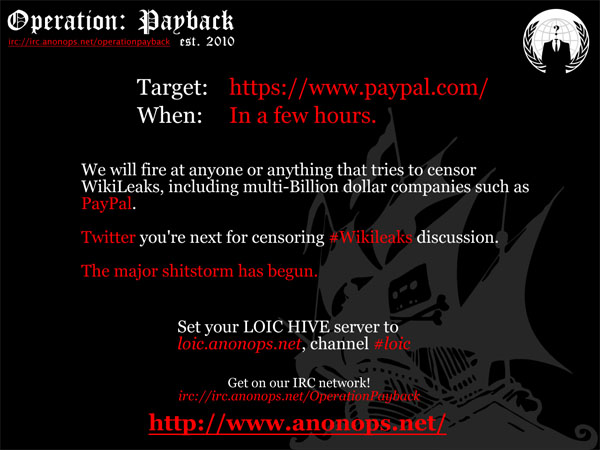
During lunch I was browsing the web and catching up on the news, when I saw this image on an article by TechEye.net:

Apparently it is a call-to-arms flyer for Operation Payback which is being run by Anonymous and is an exercise in “retribution” against those companies and organizations seen to be censoring Wikileaks. What caught my eye was the statement towards the end of the flier:

Set your LOIC HIVE server to

loic.anonops.net, channel #loic

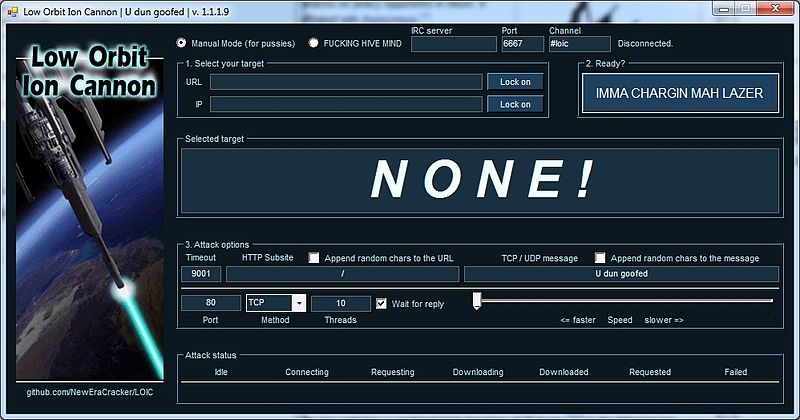
Curious, I did a Google search and discovered that LOIC is the “Low Orbit Ion Cannon”, a piece of software that floods a target server with TCP, UDP or HTTP requests. What is particularly scary is the simplicity of it’s user interface:

But it gets worse… LOIC features something called the HIVEMIND. This allows a user to turn over control of their LOIC app to a remote user, effectively it becomes a node on a “voluntary botnet” !

Listening to an IRC command channel a LOIC instance will obey commands such as:

!lazor targetip=127.0.0.1 message=test_test port=80 method=tcp wait=false random=true
!lazor start
!lazor stop

Needless to say anyone installing LOIC is taking several risks, firstly by installing software with dubious origins but more importantly by giving control to an anonymous group who are then performing DDOS attacks with their machine which is illegal in most countries.

It will be interesting to see how these attacks play out in the next few days and if they will be recorded as the battles of the first real cyberwar.

4 little words

I was horrified to see that the Department of Homeland Security has begun to seize the domains of copyright infringing websites. Now I’m all for copyright protection and theft is theft but this kinda of censorship is a slippery slope.

But it did get me thinking…

Since it is only the DNS entries that have been seized and you are still able to visit these sites if you know their IP address, wouldn’t be nice to have a DNS like way of remembering these IP addresses?

And so I give you the 4LW  ‘protocol’ (4 little words).

Basically you grab 256 words from the dictionary in the S/KEY RFC, then with a simple lookup table (where each octet of the IP address is mapped to a word in the dictionary) you can convert any IP address into 4 hopefully easy to remember words and back again.

For example:

The IP address for rabidgremlin.com is 174.143.242.193, if you run this through 4LW you get the following phrase: LICK GORY ULAN MUTT

Some others:

210.55.180.158 (google.com) = ROOM RED LULU IDEA

72.30.2.43 (yahoo.com)= ACHE ION ANA NAY

72.21.210.250 (amazon.com)= ACHE FUM ROOM WENT

65.49.90.35 (whitehouse.gov) = TEN OWL BLUR LAM

184.84.165.161 (dhs.gov) = MASH BAWD KANE JERK

Of course this is bit of a toy idea (only good for IPv4 etc) but the romantic in me can see these little 4 word phrases hidden away in cryptic emails or scrawled as defiant graffiti on buildings of certain organizations :)

For those of you who are interested here is the dictionary for 4LW. I created it by grabbing every 8th word (starting with the first one) from the S/KEY dictionary. A = 0, AID = 1, YARN=255 etc.

{ "A", "AID", "ANA", "ARC", "AT", "AWN", "BAR", "BET", "BOG", "BUG", "CAB", "COD", "COY", "DAD",
 "DES", "DOE", "DUE", "EGO", "ETC", "FAT", "FIR", "FUM", "GAP", "GIL", "GUY", "HAP", "HER", "HIT", "HOW", "ICY", "ION",
 "IVY", "JET", "JOY", "KIM", "LAM", "LEN", "LIT", "LOW", "MAN", "MEL", "MOD", "MUG", "NAY", "NIP", "NOV", "OAR", "OIL",
 "ORR", "OWL", "PAP", "PEP", "PIT", "PRO", "RAG", "RED", "RIP", "RUB", "SAG", "SEA", "SIN", "SO", "SPY", "TAD", "TEN",
 "TO", "TOY", "UP", "WAG", "WET", "WOW", "YES", "ACHE", "ADEN", "AIDS", "ALLY", "AMES", "ANNA", "ARGO", "AUNT", "AWAY",
 "BAIT", "BAND", "BARN", "BAWD", "BEAU", "BELT", "BETA", "BILL", "BLED", "BLUR", "BOHR", "BONE", "BORE", "BOYD", "BRIG",
 "BULL", "BURT", "CAFE", "CANE", "CASH", "CHAD", "CHIN", "CLAD", "CLUB", "CODE", "COLT", "CORD", "CRAG", "CUBE", "CURL",
 "DANG", "DATE", "DEAN", "DEFY", "DIET", "DISH", "DOME", "DOUR", "DRUB", "DUKE", "EACH", "EDDY", "ELBA", "EROS", "FAIL",
 "FAST", "FELL", "FILE", "FISH", "FLAT", "FLOW", "FOLK", "FORK", "FRAY", "FULL", "GAGE", "GAME", "GAVE", "GIBE", "GIST",
 "GLOW", "GOES", "GORY", "GREW", "GULF", "HAAG", "HALO", "HARM", "HAWK", "HEED", "HERE", "HIKE", "HOBO", "HONE", "HOST",
 "HUFF", "HURD", "IDEA", "IOWA", "JACK", "JERK", "JOBS", "JOVE", "JUNE", "KANE", "KERN", "KISS", "KNOW", "LACK", "LAME",
 "LATE", "LEAK", "LENT", "LICK", "LILA", "LINK", "LOAM", "LONG", "LOST", "LULU", "LYLE", "MAIL", "MANN", "MASH", "MEAD",
 "MEMO", "MILD", "MINI", "MOAN", "MONA", "MORN", "MUDD", "MUTT", "NASH", "NEIL", "NIBS", "NOEL", "NOUN", "ODIN", "OLIN",
 "ONUS", "OUTS", "QUOD", "RAIN", "RAYS", "REEK", "RICE", "RINK", "ROCK", "ROOM", "ROVE", "RULE", "RUST", "SALK", "SAUL",
 "SEAM", "SELF", "SHAW", "SHOW", "SILK", "SITE", "SKIT", "SLIM", "SLUR", "SOAK", "SOME", "SOWN", "STIR", "SUMS", "SWAN",
 "TAKE", "TEAL", "TEND", "THEE", "TICK", "TIME", "TOIL", "TOOT", "TRAM", "TROT", "TUNE", "ULAN", "VAIN", "VEIN", "VINE",
 "WAIL", "WANE", "WAST", "WEAN", "WENT", "WHET", "WINE", "WOLF", "WORN", "YARN" }

UPDATE: Wow, I got a surprisingly big response to this post, making it to the front-page of Hacker News and Reddit, here are some updates:

Android Tips: Generating a coverage report for your unit tests

The Android testing framework has the built-in ability to generate a code coverage report for your unit tests. Unfortunately this functionality is not available within the Eclipse IDE, so you have to resort to some command line and Ant fu.

First off, you need to create a test project for your Android app and some unit tests.

Next, run the following command:

android update test-project -m <path to app project> -p <path to test project>

This will create a Ant build.xml file in your test project’s top-level directory. The android tool can be found in the tools folder of your SDK installation.

Now, from your test projects top-level directory, run the following command:

ant coverage

This will build, instrument, deploy and run your unit tests. It will also generate a HTML coverage report.

The location of the report will be displayed in the last few lines of the Ant script’s output. Point a web browser at the coverage report and weep :)

UPDATE: if you are using SDK 14 or later then the command to run is now:

ant emma debug install test

See the SDK Ant command reference for more details

Android Tips: The emulator

In the last two months I have written two Android apps, in doing so I have uncovered a number of tricks and quirks which I thought I’d share. To start with, the Android emulator…

Keyboard shortcuts

Surprisingly, the GUI for the emulator does not provide controls for a number of functions such as emulating a change in orientation, instead you need to use keyboard short-cuts.

Two particularly useful ones are:

  • 7 on your keypad (or CTRL+F11) which cycles through portrait and landscape layouts.
  • F8 which toggles cell networking on and off

Connecting to the emulator console

To connect to the emulator console you need to telnet to the emulator’s console port on localhost. The console port is displayed in the title bar of the emulator window and is normally 5554.

telnet localhost 5554

You can also use the  adb command (in the tools folder of the SDK install) to list out all the running emulators and their ports:

adb devices

Emulating power state

Through the emulator console you can easily manipulate the power state of the emulator. To see the current state type:

power display

To emulate unplugging the device from a power source, type:

power ac off

Note: for some reason this does not seem to change the charging state of the emulated device.

To “plug” the device back in:

power ac on

To set the battery level to 10% use:

power capacity 10

Note: This is incorrectly documented in the SDK documentation.

There are a bunch of other commands that can be run through the emulator which allow simulation of  network connectivity & latency, telephony, SMS services etc.

Accessing the shell

Using adb you can get access to the shell of the OS running within the emulator. This allows you to execute some of the low level apps installed on the  device. To access the shell type:

adb shell

Since Android is running on a flavour of Linux you can move around the using ls and cd commands. Type the following to see where the native executables are installed:

echo $PATH$

Most of the useful applications can be found in /system/bin. Run this to see what you have access to:

ls /system/bin

Going monkey on your app

Within the shell you can run the Monkey stress tool. This tool emulates random button mashing, phone rotations and screen touches to stress out your app. Unleash monkey with the following command:

monkey -p your.package.name -v 500

Turning Japanese

Sometimes when you run Monkey it will change your IME, often to the Japanese one. To fix this long press on an input field, then select Input Method and then Android Keyboard from the pop-up options.

Setting the emulator’s date & time

Via the shell you can set the emulator’s date & time which is particularly useful for testing time based logic. Unfortunately the date command only accepts the number of seconds since 1970-01-01 00:00:00 UTC as input, which is a little tedious to use. However you can use the following command (which I found on Diego Torres Milano’s blog) to set the date from your command prompt (if you are running a unixy operating system):

adb shell date $(date --date="2008-01-31 17:46:59" +%s)

Note: This spits out an error message saying “settimeofday failed Invalid argument” but seems to work anyway.

Wrap up

Hopefully this has been useful, my next post will cover Preferences and how to use them in your apps. Be sure to check out the Android SDK tools documentation for more info.