Party like its 1234567890

So one of my colleagues (thanks Matthew) just sent me this link which is so geeky I just had to blog about it.

Apparently on Friday, February 13th 2009, 23:31:30 GMT the Epoch time count will read “1234567890” for the first (and last time).

For those of you who don’t know what Epoch time is (shame on you) it is basically a count of the number of seconds since 00:00:00 GMT on January 1, 1970. Computer systems use this mechanism for storing time because they handle nice big integer numbers very efficiently.

Of course when 2038 rolls around we are all going to be in trouble because the count of milliseconds will be too big to store in the space that most computer systems allocate for storing this time count!

By then of course we should all be using at least 64bit systems so it shouldn’t be a problem and we won’t Y2K48 problem (he says smirking).

If you are planning a “1234567890” party (you are planning a party right?) then this “countdown” would be ideal to project up onto a wall or show on a big screen :)

The top 25 open source projects

Just received an update email from sourceforge which contained the list of the top 25 projects hosted with them for January 09. Some really nice bits of software here:

1. ADempiere ERP Business Suite

ADempiere Business Suite ERP/CRM/MFG/SCM/POS done the Bazaar way in an open and unabated fashion. Focus is on the Community that includes Subject Matter Specialists, Implementors and End-Users. We are a community fork of Compiere.

2. MediaInfo

Get technical information and tags of a lot of multimedia files. Supported formats : – Video : AVI/OGM/MKV/MPG/VOB/MP4/3GP/… – Audio :MP3/OGG/MKA/MP4/AAC/…

3. Notepad++

Notepad++ is a generic source code editor (it tries to be anyway) and Notepad replacement written in c++ with win32 API. The aim of Notepad++ is to offer a slim and efficient binary with a totally customizable GUI.

4. Zenoss Core – Enterprise IT Monitoring

Zenoss Core is an enterprise network and systems management application written in Python/Zope. Zenoss provides an integrated product for monitoring availability, performance, events and configuration across

layers and across platforms.

5. Audacity

A fast multi-track audio editor and recorder for Linux, BSD, Mac OS, and Windows.Supports WAV, AIFF, Ogg, and MP3 formats.Features include envelope editing, mixing, built-in effects and plug-ins, all with unlimited undo.

6. MindTouch Deki (wiki): Collaboration

MindTouch Deki is an enterprise collaboration, wiki and mashup platform. Easily connect people, enterprise systems, web services, and Web 2.0 applications for business automation and superlative wiki collaboration.

7. Azureus

Azureus: Vuze is a powerful, full-featured, cross-platform bittorrent client and open content platform.


8. PostBooks ERP, accounting, CRM by xTuple

Free open source ERP, accounting, CRM package for small to midsized businesses. ERP client runs on Linux, Mac, and Windows (built with open source Qt framework). Business logic resides in PostgreSQL database.

International ERP, accounting, and CRM tools.

9. Openbravo ERP

Openbravo ERP is a Web based ERP for SME, built on proven MVC & MDD framework that facilitate its customization. Already in production, Openbravo ERP encompasses a broad range of functionalities such as finance, supply chain, manufacturing & much more

10. phpMyAdmin

phpMyAdmin is a tool written in PHP intended to handle the administration of MySQL over the Web. Currently it can create and drop databases, create/drop/alter tables, delete/edit/add fields, execute any SQL

statement, manage keys on fields.

11. FreeCol

FreeCol is an open version of Colonization. It is a Civilization-like game in which the player has to conquer the new world.

12. MinGW – Minimalist GNU for Windows

MinGW: A native Windows port of the GNU Compiler Collection (GCC), with freely distributable import libraries and header files for building native Windows applications; includes extensions to the MSVC runtime to support C99 functionality.

13. Mumble

Low-latency, high-quality voice communication for gamers. Includes game linking, so voice from other players comes from the direction of their characters, and has echo cancellation so the sound from your loudspeakers won’t be audible to other players.

14. 7-Zip

7-Zip is a file archiver with the high compression ratio. The program supports 7z, ZIP, CAB, RAR, ARJ, LZH, CHM, GZIP, BZIP2, Z, TAR, CPIO, ISO,MSI, WIM, NSIS, RPM and DEB formats.

15. ZK – Simply Ajax and Mobile

ZK is Ajax Java framework without JavaScript. With direct RIA, 200+ Ajax components and markup languages, developing Ajax/RIA as simple as desktop apps and HTML/XUL pages. Support JSF/JSP/JavaEE/Hibernate/.., and Ajax script in Java/Ruby/Groovy/Python/..

16. Ares Galaxy

Filesharing-Bittorrent p2p client connected to TCP supernode/leaf network and UDP DHT network. Ares features a built-in directshow media player, a powerful library manager, shoutcast radio support and can be used to host p2p Chatrooms.

17. webERP web-based ERP Accounting

Integrated accounting ERP system. Multi-language/currency/inventory locations. Full double entry. SO/AR/PO/AP/GL/Bank/Sales Analysis. BOMs/assemblies/kit-sets. Flexible pricing. Emailable pdf reports. Fast PHP created html for any browser.

18. Hyperic HQ Enterprise Monitoring

Enterprise monitoring and management for web apps on Linux, Mac, Unix & Windows. Auto-discovers 70+ technologies incl. hardware, networks, virtualization, and apps. Includes: monitoring, alerts, remote diagnostics, and control actions from web console.

19. ffdshow tryouts

ffdshow is a DirectShow filter and VFW codec for many audio and video formats, such as DivX, Xvid and H.264. Over 70 bugs have been fixed, codecs have been updated, and support for a few new formats has been added in the tryouts. Vista is now supported.

20. KeePass Password Safe

KeePass Password Safe is a free, open source, light-weight and easy-to-use password manager for Windows. You can store your passwords in a highly-encrypted database, which is locked with one master password or key file.

21. OrangeHRM – Human Resource Management

OrangeHRM is an Open Source Human Resource Management System that covers Personnel Information Management, Employee Self Service, Leave, Time & Attendance, Benefits, and Recruitment. Tags: HRM, HRMS, HCM, HRIS, EHRMS, Human Capital Management

22. Firebird

Firebird RDBMS offers many ANSI SQL features & runs on Linux, Windows & several Unix platforms. Features excellent concurrency & performance & powerful stored procedure & trigger language.

23. Webmin

A web-based system administration tool for Unix servers and services.

24. PortableApps.com: Portable Software/USB

PortableApps.com allows you to carry your favorite computer programs and all of your bookmarks, settings, email and more with you on a portable device (USB flash drive, iPod, portable hard drive, CD, etc) and use them on any Windows computer.

25. Tcl

Tool Command Language (Tcl) is an interpreted language and very portable interpreter for that language. Tcl is embeddable and extensible, and has been widely used since its creation in 1988 by John Ousterhout. See

http://www.tcl.tk/ for more info.
Its all about clarity

Over the last 15 odd years I have been involved with dozens of IT projects of all shapes, sizes. Recently I have been reflecting on why some of these projects were a dream and delivered successfully, whilst others were a complete nightmare and went horribly wrong.

An obvious factor is the size of the project but that does not ring true. I have been involved with huge projects that went like clockwork and small projects that just couldn’t seem to get off the ground. The same is true for projects with complex or simple domains; projects with untried technologies or projects with proven technologies.

So what was the differentiator?

After much pondering I have come to the conclusion that those projects that were most successful had a good deal of clarity. Clarity in what needed to be done, why it needed to be done and how it was going to be done.

So I’ve come up with a new catchphrase (which I intend to bandy about at every opportunity):

“CLARITY leads to FOCUS, FOCUS leads to DELIVERY”

Actually I really wanted to use VELOCITY in there somewhere and DELIVERY is just so so unsexy so perhaps its still a work in progress but I digress.

So what do I mean by clarity ? Well pretty much exactly what it’s definition says “The state of being clear in thought”.

Of course this isn’t a new concept, which is why we have the waterfall process with its BDUF (big design up front) approach. Unfortunately this process actually has the opposite effect because it tends to silo the project members around particular phases and then uses big fat documents as a means of communication between these silos. At each step of the way clarity around the why, what and how is typically eroded or even (as I have seen in some cases) corrupted, all of which leads to the classic customer reaction ,when they see their software for the first time, of “What the hell is that, thats not what I wanted”.

This of course is where agile processes come into play with their sleek processes that allow a project to deliver efficiently and successfully. Of course without clarity an agile project degenerates into a mess, with quality going out the window in an effort to meet iteration deadlines, constant quick fixes, a stressed out team and a failed project.

So how do you about gaining clarity?

The best approach I have seen is to get as many of the people who are going to be involved with the project into a room to work out the why, what and how. The group should include the stakeholders, end-users, subject matter experts, architects, UI designers, testers, business analysts, developers, project managers, infrastructure bods. Pretty much anyone who can add value to the process.

Don’t panic, even for large systems the effort involved for this is measured in hours and days, not weeks and months. I would however, suggest you find a good facilitator to keep what is typically a fairly large group of people focused.

Here are some techniques that I have used or seen used to nail down the why, what and how:

To capture the why, write a vision statement. It doesn’t have to be book. In fact put a limited on the length of the statement such as “25 words” or “3 sentences” or if you want to be particularly nasty: “7 words”.

To capture the what, you can uses any number of techniques. I find that visual ones work best (and are easily done on a whiteboard) so use-case diagrams, storyboards or UI wireframes and entity or domain models are the order of the day.

In a similar vein, to capture the how, nothing beats a deployment model and some sequence or activity diagrams (all in UML of course).

So to make your IT project a success make sure you have clarity and remember

“CLARITY leads to FOCUS, FOCUS leads to DELIVERY” :)

Check out Scott Ambler’s Agile Modelling site which covers some of the techniques above and has a bunch of other practical and interesting ideas.

mPass is live !

_Update: If you are having issues with mPass then please send email to onlinebooking@airnz.co.nz. The nice folk at Air New Zealand will be happy to help you :)_

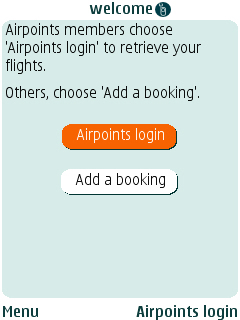
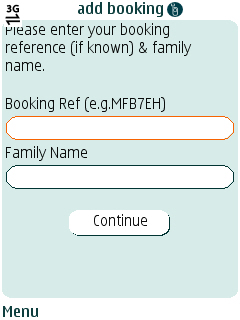
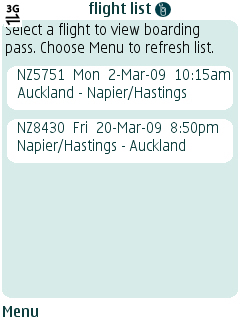
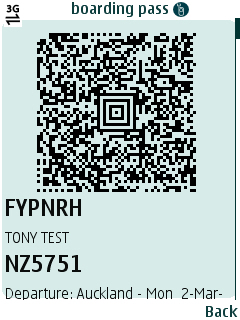
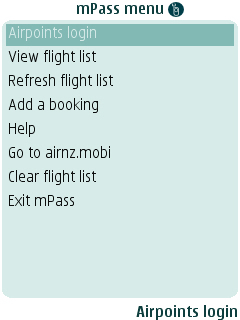
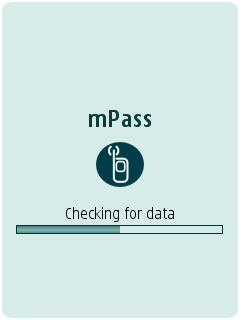
I’m quite pleased with this bit of work: mPass allows you to download your boarding passes for Air New Zealand flights onto your mobile phone. It generates a bar code that you can then scan at their kiosks to check-in or at the gates to board. Pretty cool if I must say so my self.  Its all part of Air New Zealands new domestic travelling experience.

If you want to download mPass then visit http://airnz.mobi using your web browser on your mobile phone and click on the “Download mPass” link.

Here are some screen shots of the application running that captured off my Nokia N73:

Also if you are at the airport and use the new gates try and get a look-see at the application with all the pretty coloured cells (which show the status of passengers on a flight) that is attached to the gate, I worked on that one too :)

If you are an Airpoints member then check out http://myairnz.com this was put together by some of my team mates. It gives you instant access to your bookings, airpoints info, weather, news, arrivals and departure times, events and much more.

Google launches new browser

Ooooooo, Just found a link to the new Google Chrome browser on my Google home page.

Its pretty cool, very lightweight and very very fast. It even has as “stats for nerds” link on it’s task manager which gives heaps of detail on memory and CPU usage. The internals of the browser are pretty interesting as are the reasons for building a new browser.

Had a couple of issues with some sites and a few pages that seemed to be showing old content! Also gmail doesn’t work it seems to hangup when redirecting to the login page and it doesn’t remember my user name and password for my corporate proxy. Still not bad for a beta.

Check out http://www.google.com/chrome

Bubbles! now uses Google App Engine

Just for kicks I decided to port the backend services for my Google Android app, Bubbles!,  to use the Google App Engine.

For those of you who don’t know Googles App Engine is a “free” application hosting environment. It promises to be able to scale Google style (as long as you pay of course).

The free account gives you 500Mb of persistent storage and bandwidth and CPU for around 5million pages views a month which is not bad for free.

Python

For some strange reason Python is the language of choice for app engine. I’ve never really taken to Python and I don’t really like languages where indentation is syntactically meaningful but it wasn’t too painful after skimming some tutorials on the web and running through the tutorial.

SDK

The SDK is only a couple of megabytes to download (you need Python 2.5 installed) and ran fine on my Windows XP desktop and Ubuntu laptop. Having said that the SDK doesn’t give you very much in the way of an IDE, it just gives you a dev web server and a tool to upload your application to the hosting platform. So I just used gedit and Notepad++ (which both have Python syntax highlighting) as my editors.

Platform Features

App Engine provides a pretty easy to use framework for building web applications in Python. The engine is WSGI compliant so you can plugin in any of the common Python frameworks such as Django, CherryPy, Pylons and web.py. Django seems to be the web app framework of choice.

Apart from a web application framework, the engine also provides APIs for email, image manipulation, URL fetching, users and datastorage.

The Users API is pretty cool as it hooks into Google’s user accounts so anyone with a Google account can log into your application (if you want them too).

The datastore is an object based transaction engine with a SQL like syntax. On the face of it is very clean and easy to use but its here that I had the biggest headaches when porting the Bubbles! services.

**

Porting the services**

Bubbles! uses 3 very simple services: popin, popout and getpops (where a POP is a point of presence). These services take input parameters from the query string and return JSON response strings.

Creating a class to represent a Pop in the datastore was very simple; as was creating and deleting Pops in the datastore. The biggest issue I had here was coming up with an elegant way of validating the input parameters.

But when I came to getting things back out of the datastore things went a little pear shaped…

In my Pop class I was storing the latitude and longitude of the POP as floating point numbers. To retrieve the nearby POPs (in the getpops service) I was using a typical SQL like query as follows:

SELECT * FROM POP<br /> WHERE lat >= :1 AND lat < :2 AND lng >= :3 AND lng < :4<br /> ORDER BY lastdatemodified

Where :1, :2, :3 and :4 were set to currentLat-0.001, currentLat+0.001, currentLng-0.001 and currentLng+0.001._

_

This raised the first issue: Only one “property” can have an inequality clause in a query. Turns out that the datastore has some pretty weird and wonderful restrictions, of course this particular one put a major spanner in the works.

Geohash to the rescue

What I needed was a quick way of calculating if a point in space was close to another one and to be honest the approach I was never happy with the approach I used above because it found points in rectangular area not a circular one.

After a little bit of research (I love the web), I came across this concept: the Geohash.

This cool (public domain) algorithm takes a decimal lat/long and turns it into a string. For instance

-36.843480 174.767138

Becomes:

rckq2uve1mx3

Not only does this give you something that you can stick on a #aliases: http://geohash.org/rckq2uve1mx3 but more importantly for points near to each other the first few characters of the hash are the same !

-36.843480 174.767138  =  rckq2uve1mx3<br /> -36.844381 174.765611  =  rckq2usmvvsd<br /> -36.848508 174.765451  =  rckq2gumfhjr<br /> -36.848457 174.748261  =  rckq27zy1tg8

So the solution to my problem turns out to be remarkably easy:

  1. When creating or updating a POP I calculate the Geohash for the longitude and latitude of the POP. I take only the first 6 characters and store them with the POP
  2. When processing getpops, I calculate the Geohash for the current latitude/location, grab the first 6 characters and find any pops in the datastore that have the same stored Geohash.

My select statement is now a simple equals and runs far faster then my original implementation.

Summary

Overall Google App Engine is an interesting platform and baring some quirks it does appear to be a viable platform for building web applications on.

Bubbles! didn’t make it

Google Android Developer Challenge LogoJust received an email from the Android Developer Challenge team, seems that Bubbles! my Google Android application didn’t make it into round two:

_During the past few weeks, 100+ judges around the world reviewed over 1,700

applications. They were extremely impressed with the diversity and the

large number of high quality entries submitted. It is clear that the number

of great applications far exceeds the 50 top scoring applications that will

move on to the final round of the Android Developer Challenge._

_We regret to inform you that your entry was not among the top 50

submissions._

Ah well it was worth a go. Apparently they are going to be putting up an Android Developer Challenge

Gallery shortly so we will get to see what I was up against.

Bubbles! – My Google Android Developer Challenge Entry

Google Android Developer Challenge LogoWell working into the wee hours of the morning I finally finished off my Google Android Developer Challenge entry.

Bubbles! allows you to create a pop (point of presence) that is ‘broadcasted’ from your phone. Other Bubbles! users in close proximity (about 50m) get to see your pop and you get see theirs. Of course as you move around so does your pop.

A pop is anonymous and consists of a message and a nick name that you choose for yourself.

Bubbles! Screenshots

I was going to implement a feature whereby you could tie a pop to a location. This would allow you to attach messages to a point in space for other users to see. Unfortunately I ran out of time but its next on my list to build.

Here are a few screenshots so you can see Bubbles! in action (click to see them full sized)

I’m also thinking of including the ability to see the history of pops for another user and perhaps even the ability to initiate a chat session with another Bubbles! user. Maybe even overlay the pops unto a MapView (which would hook into Google Maps) .

Of course if I get into the top 50 for the first round of the challenge I’ll have some money to invest into more development. We’ll have to see how I go but here’s hoping.